
Virtual machines have become an integral part of the modern computing landscape. They have revolutionized the way we use and manage our computers, making it easier to run multiple operating systems and applications on a single physical machine. However, for many people, the concept of virtual machines can be confusing and overwhelming. In this blog post, we will break down the complexities of virtual machines and provide a comprehensive guide to understanding them. From explaining what virtual machines are to discussing their various uses and benefits, this post aims to make virtual machines simple and easy to understand.
Explaining Virtual Machines
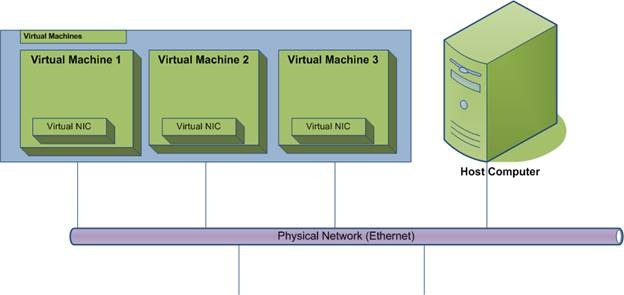
To put it simply, a virtual machine (VM) is a software-based emulation of a physical computer system. It allows you to create a self-contained environment that mimics a physical computer, complete with its own operating system, hardware, and applications. This means that you can run multiple virtual machines on a single physical machine, each with its own unique set of resources and configurations.
Explanation of Virtual Machines
The concept of virtual machines dates back to the 1960s when IBM first introduced the concept of time-sharing, allowing multiple users to access a single mainframe computer simultaneously. However, it wasn't until the early 2000s that virtual machines became widely available and accessible to the general public.
Today, virtual machines are used for a variety of purposes, including software development, testing, and running legacy applications. They also play a crucial role in cloud computing, where they allow for efficient resource allocation and scalability.
One of the most popular virtual machine software is VMware, which was founded in 1998 and has since become a leader in the virtualization market. Other notable virtualization software includes Oracle VM VirtualBox, Microsoft Hyper-V, and Citrix XenServer.
Benefits of Virtual Machines
There are several benefits to using virtual machines, both for personal and business purposes. Here are some of the most significant advantages of virtual machines:
- Cost Savings: By running multiple virtual machines on a single physical machine, you can save money on hardware costs and reduce energy consumption.
- Flexibility: Virtual machines allow you to run different operating systems and applications on a single machine, making it easier to switch between environments and test new software without affecting your main system.
- Isolation: Each virtual machine is isolated from the others, meaning that if one VM crashes or gets infected with malware, it won't affect the other virtual machines or the host system.
- Scalability: With virtual machines, you can easily add or remove resources as needed, making it easier to scale your computing power based on your needs.
- Easy Backup and Recovery: Since virtual machines are self-contained, they can be easily backed up and restored in case of system failures or disasters.
Understanding AWS Virtual Machines
Amazon Web Services (AWS) is a cloud computing platform that offers a wide range of services, including virtual machines. AWS virtual machines, also known as Amazon Elastic Compute Cloud (EC2), provide users with scalable computing capacity in the cloud. This means that you can create and manage virtual machines on AWS without having to worry about the underlying infrastructure.
Types of AWS Virtual Machines
AWS offers a variety of virtual machine types, each designed for specific use cases and workloads. Here are some of the most common types of AWS virtual machines:
- General Purpose: These virtual machines are suitable for a wide range of applications, including web servers, small databases, and development environments.
- Compute Optimized: These virtual machines are designed for compute-intensive workloads, such as high-performance computing, scientific modeling, and batch processing.
- Memory Optimized: These virtual machines are ideal for memory-intensive applications, such as in-memory databases, real-time big data processing, and high-performance computing.
- Storage Optimized: These virtual machines are designed for storage-intensive workloads, such as data warehousing, log processing, and distributed file systems.
How to Create an AWS Virtual Machine
Creating an AWS virtual machine is a straightforward process. Here's a step-by-step guide on how to create an AWS EC2 instance:
- Log in to your AWS account and navigate to the EC2 dashboard.
- Click on the "Launch Instance" button.
- Choose the AMI (Amazon Machine Image) that best suits your needs. An AMI is a pre-configured template that contains the operating system, applications, and other settings for your virtual machine.
- Select the instance type based on your workload requirements.
- Configure the instance details, such as the number of instances, network settings, and storage options.
- Add any additional storage volumes if needed.
- Configure security groups to control inbound and outbound traffic to your virtual machine.
- Review and launch your instance.
- Once your instance is launched, you can connect to it using SSH or Remote Desktop, depending on the operating system you chose.
What Are Examples of Virtual Machines?

Virtual machines are used in various industries and for different purposes. Here are some examples of virtual machines in action:
- Software Development: Developers often use virtual machines to test their code in different environments without affecting their main system.
- Testing and Quality Assurance: Virtual machines are commonly used for software testing and quality assurance, allowing testers to run multiple tests simultaneously on different operating systems and configurations.
- Legacy Application Support: Many organizations still rely on legacy applications that only run on older operating systems. Virtual machines allow these applications to be run on modern hardware without having to maintain outdated systems.
- Cloud Computing: As mentioned earlier, virtual machines play a crucial role in cloud computing by providing scalable computing resources to businesses and individuals.
- Education: Virtual machines are also used in educational settings to teach students about different operating systems and software without having to set up physical machines.
How Do Virtual Machines Work?

To understand how virtual machines work, we need to look at the two main components of a virtual machine: the hypervisor and the guest operating system.
The Hypervisor
The hypervisor is a layer of software that sits between the physical hardware and the virtual machines. It is responsible for managing and allocating resources to each virtual machine, such as CPU, memory, storage, and network bandwidth. There are two types of hypervisors:
- Type 1 (Bare-Metal): This type of hypervisor runs directly on the physical hardware, making it more efficient and secure. Examples include VMware ESXi, Microsoft Hyper-V, and Citrix XenServer.
- Type 2 (Hosted): This type of hypervisor runs on top of an existing operating system, making it less efficient but easier to set up and manage. Examples include VMware Workstation, Oracle VM VirtualBox, and Microsoft Virtual PC.
The Guest Operating System
The guest operating system is the operating system that runs inside the virtual machine. It interacts with the hypervisor to access the underlying hardware and resources. From the guest operating system's perspective, it is running on a physical machine, unaware that it is actually running on a virtualized environment.
When a virtual machine is created, the hypervisor allocates a portion of the physical resources to it, creating a virtualized environment that mimics a physical computer. The guest operating system then uses these resources to run applications and perform tasks, just like a regular computer.
Virtual Machines for Home Use
While virtual machines are commonly used in business and enterprise environments, they can also be beneficial for home users. Here are some ways you can use virtual machines at home:
- Running Multiple Operating Systems: If you want to try out a new operating system without having to install it on your main computer, you can use a virtual machine to run it. This allows you to test different operating systems and configurations without affecting your main system.
- Secure Browsing: Virtual machines can be used for secure browsing by creating a virtual machine with a minimal operating system and only the necessary applications. This way, if you encounter any malware or viruses while browsing, it will only affect the virtual machine and not your main system.
- Gaming: Virtual machines can also be used for gaming, especially for older games that may not be compatible with modern hardware and operating systems. By creating a virtual machine with an older operating system, you can play these games without having to maintain a separate physical machine.
Easy-to-Use Virtual Machine
While setting up and managing virtual machines may seem daunting at first, there are several easy-to-use options available for beginners. Here are some of the most user-friendly virtual machine software:
- VirtualBox: VirtualBox is a free and open-source virtualization software that is suitable for both personal and business use. It has a user-friendly interface and supports a wide range of operating systems.
- VMware Workstation Player: VMware Workstation Player is a free virtualization software that is ideal for personal use. It has a simple and intuitive interface and supports a variety of operating systems.
- Parallels Desktop: Parallels Desktop is a popular virtualization software for Mac users. It allows you to run Windows and other operating systems on your Mac without having to reboot.
Guide to Virtual Machines
In this guide, we have covered the basics of virtual machines, including what they are, how they work, and their various uses and benefits. We have also discussed AWS virtual machines and provided examples of virtual machines in action. Whether you are a beginner looking to learn more about virtual machines or a seasoned professional looking to expand your knowledge, this guide has something for everyone.
Virtual Machines Made Simple
In conclusion, virtual machines have become an essential tool in the world of computing. They allow us to run multiple operating systems and applications on a single physical machine, making it easier to manage and utilize our resources. With the rise of cloud computing, virtual machines have become even more prevalent, providing scalable computing power to businesses and individuals alike. By understanding the basics of virtual machines, you can take advantage of their benefits and use them to enhance your computing experience.






0 Comments